
User management fundamentals (Salesforce)
After this you will be able to;
- Explain basic architecture for Salesforce user management
- Explain fundamentals for user management relating to Skedulo on Salesforce
A high level overview
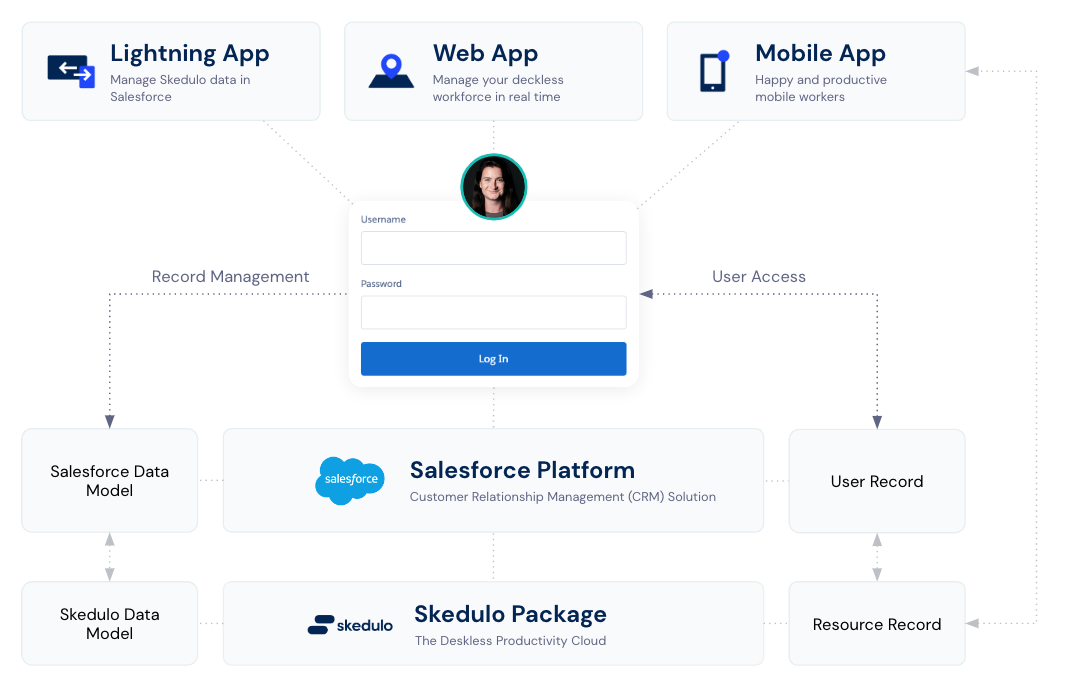
For all customers using the Skedulo on Salesforce solution, a package is installed into your Salesforce environment adding The Skedulo Deskless Productivity Cloud on top of the Salesforce platform. When the Skedulo package is installed, it will add all the necessary data required to utilise Skedulo applications and capabilities. With Salesforce acting as the platform for Skedulo, all user access is provisioned and controlled using Salesforce, granting the ability to access the Skedulo data model.
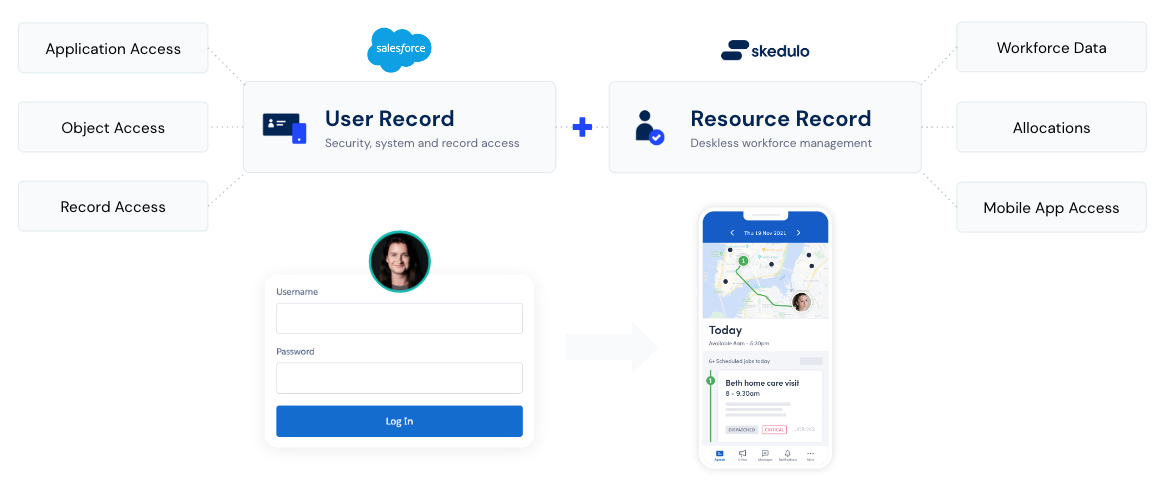
For anyone accessing Salesforce or Skedulo applications, they must have a Salesforce user record. A single Salesforce user record controls user access to all Skedulo applications, tabs and objects. Depending on how the user has been configured, a single user record can use the same Salesforce credentials to access the Skedulo Web App and Skedulo Mobile application. Therefore it is an important aspect for you to understand how Salesforce users are created and configured.
There are three main applications that a user will interact with depending on their needs. Salesforce, Skedulo Web App and the Skedulo mobile app. Each application updates various objects and records that are stored and managed on the Salesforce platform. For Skedulo on Salesforce, all applications are accessing the same database managed in Salesforce and a user can update these records using any of the three applications, provided it offers the ability to do so.
Types of users
Users are typically broken down into three generalised types, administrators, schedulers and resources. Each user group has their own needs when it comes to accessing the solution.
| User Type | Needs |
|---|---|
| Administrator | Access Salesforce to update Skedulo base data, manage record access, create reports and manage other users in the system |
| Scheduler | Access Salesforce to manage supporting data and access the Skedulo Web App to manage their deskless workforce |
| Resource | Access the mobile App to manage their schedules and allocated work |
As stated before, a single Salesforce user can provide universal access all Skedulo applications. Therefore a single user record can be used to create work inside the Skedulo Web App as a scheduler, and if configured correctly, can then log into the Skedulo mobile app using the same credentials to deliver the work that was allocated to them. Consequently this means that user records can be configured in such as way to meet a range of different use cases and user types, depending on your organisational needs.
User and resource records
Administrators and schedulers will only require a user record but when it comes to deskless workers they will require a user record and a resource record. To access Salesforce and the Skedulo Web App only a user record is required, however Deskless workers will require a user record plus a resource record that is linked to a corresponding user record. This is because inside the Skedulo data model, all workforce data relating to a deskless worker such as availability, tags, shifts and job allocations are connected to a resource record. For all deskless workers out in the field using the Skedulo mobile app, they will require a resource record to view and manage this data.
A user record;
- Gives access to Salesforce and Skedulo applications
- Provides credentials for logging in
- Controls access to data objects and fields
A resource record;
- Is linked to a corresponding user record to provide access
- Required to access the Skedulo Mobile App so workforce data can be retrieved
- Links to multiple data points for effective workforce management