
After this you will be able to;
- Discribe basic Salesforce security and access rules
- Discribe how Salesforce users interact with Skedulo & Salesforce data
When it comes to your solution security and access, Salesforce users are the cornerstone for all interactions with your data and applications. Depending on the permissions given to a user, a user will be able to read, create, update and delete records for a range of objects and record types. What your users are able to interact with is down to the profiles and permissions you assign them.
A quick summary of Salesforce users
Your Salesforce user records are how you grant people access to interact with your solution and data. Understanding how Salesforce users work is a critical aspect to ensure your data is kept safe and secure. Salesforce offers various layers of access that is granted to users, but at the core of it all Salesforce isn’t about closing down access rather it is structured around opening up access to users, which is achieved primarily through Salesforce profiles and permission sets.
The benefit of Skedulo on Salesforce is that we have taken care of a lot of the heavy lifting using core Salesforce profiles and adding Skedulo permission sets for you to allocate to your users based on their solution access requirements. This does not negate the importance of understanding how Salesforce controls user access, so we have shared some very helpful links below.
Who sees what – Salesforce
RECOMMENDED
Salesforce has a 9 part video series that explains very clearly how roles, profiles, and sharing rules work together to provide access to all the various objects and records in your Salesforce organisation. It it about 50 minutes long, however if you are serious about your solution security we strong recommend you invest the time.
Salesforce Data Security – Trailhead module
OPTIONAL
If you want to take it to the next level becoming the security expert in your organisation, then we advise you check out the Salesforce module on data security. Salesforce Trailhead is an education and training platform just like this one. So why not create a free account and earn their badge for Data Security.
Understanding user interactions
When a user record is created you are giving that person access to your solution to interact with various records based on the level of permissions you have granted them. When records are created a field called ‘Created By’ is timestamped with the users name, date and time the record was entered into the system. Furthermore, when a user updates a record this is also recorded in a seperate field called ‘Last Modified By’, which will also show a timestamp along with the user that performed the action. Whether a user is updating a record directly in Salesforce, via our Web App or within the Mobile application, a timestamp will always be recorded against the record.

This standard capability within Salesforce highlights a few key points to consider when users are updating a managing data inside your solution;
- All user interactions within Skedulo applications are created/ stored and recorded in Salesforce.
- Multiple users can access and edit a single record within the solution, depending on the permissions given to them.
- A user record can never be deleted as this would delete all audit trails of the users interactions. Salesforce users can only be deactivated.
The benefits you get when you understand user interactions
Now you might be wondering why we’re sharing all this information with you and diving down a bit down a rabbit hole here. Well there a reason but first let’s get the facts straight. All Skedulo data is stored within Salesforce. Whenever you give a user access to Skedulo applications, they are actually updating data stored in Salesforce and granted the ability to use Skedulo capabilities that extends what Salesforce has to offer. Skedulo applications gives your users an intuitive interface that can automate workflows and bulk update records in Salesforce that streamlines effective workforce management.
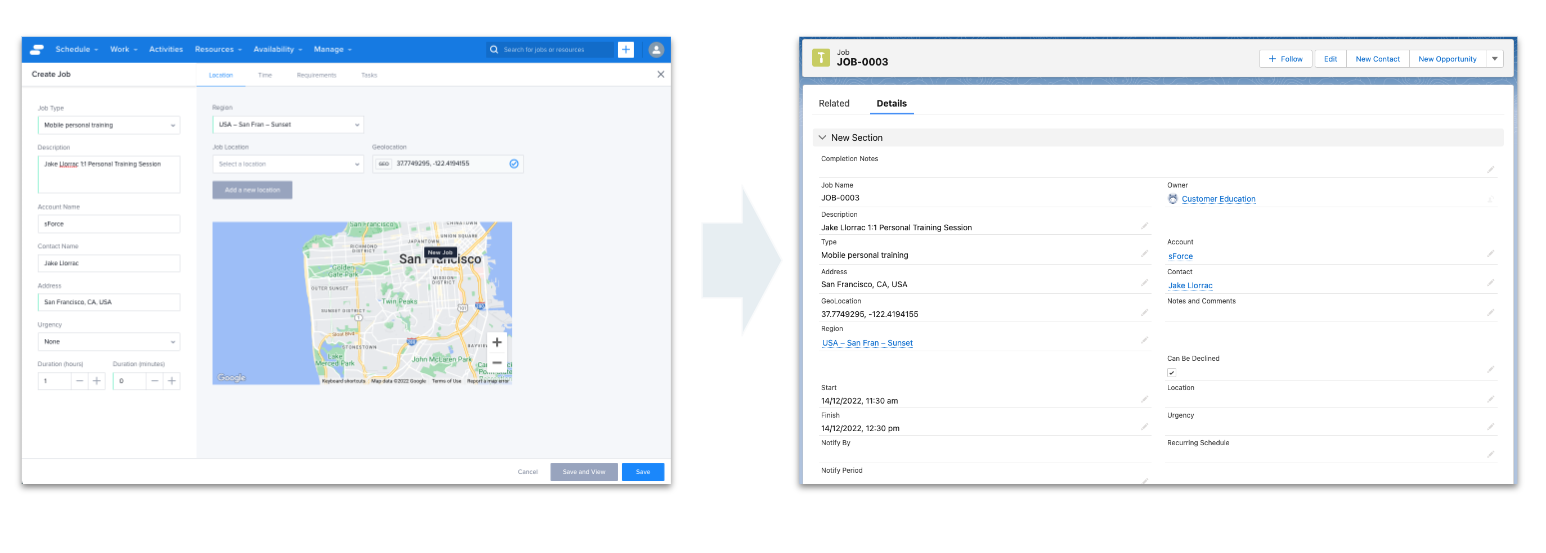
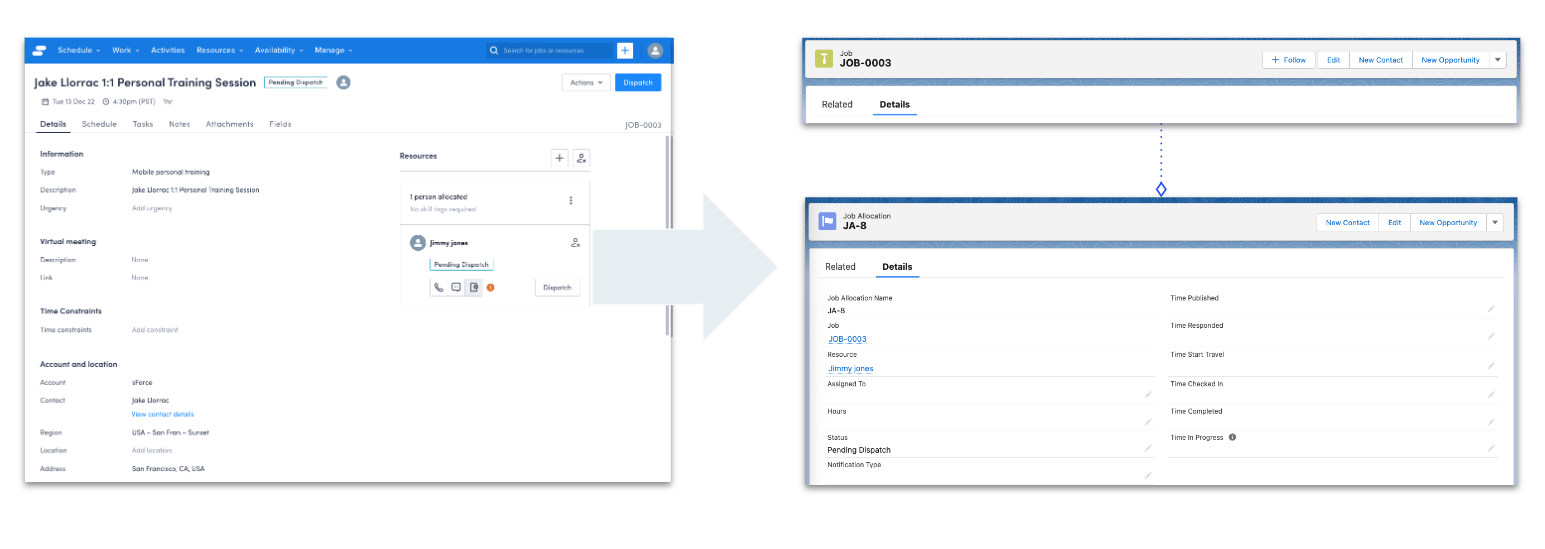
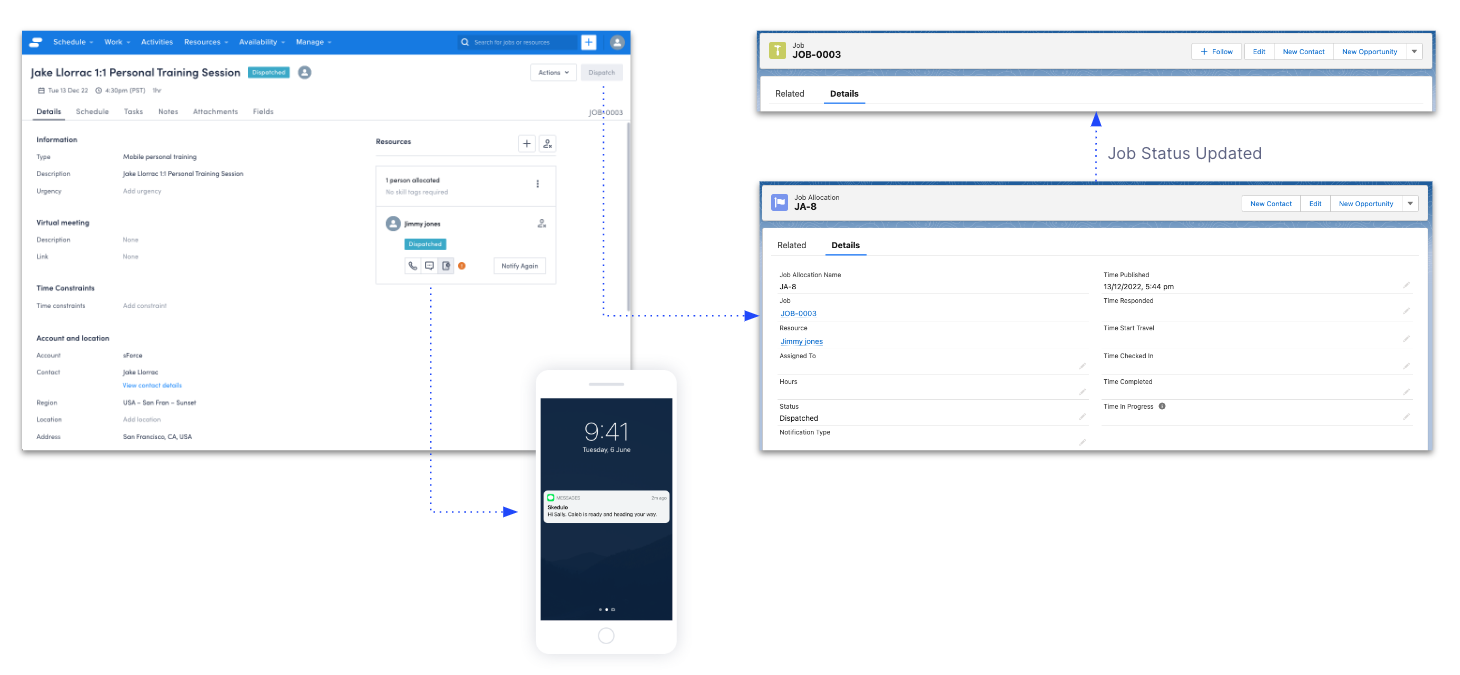
Let us show you what we mean by taking the standard job workflow where a scheduler creates a job, allocates a resource and dispatches it notifying the deskless worker, to see how various actions update records within Salesforce.
Creating the job
| Action | From within the Skedulo Web App a scheduler creates a job |
| Triggers | Skedulo sends data over to Salesforce Job record is created inside of Salesforce |
Allocating the job
| Action | Scheduler uses Skedulo’s powerful suggest engine to allocate the right worker for the job |
| Triggers | Skedulo sends data over to Salesforce A new Job Allocation record is created linking to the original job record Job record status is updated to ‘Pending Dispatch’ if all requirements are met The job details are updated in real time within the Web App |
Dispatching the job
| Action | Scheduler clicks the dispatch button to notify the allocated resource |
| Skedulo Triggers | Skedulo sends data over to Salesforce Job Allocation status field is updated to ‘dispatched’ Job status field is automatically updated to ‘dispatched’ Skedulo solution sends a push notification to the resource Resource can log into the mobile app to see the allocated work |
Why is it important to understand user interactions?
If you want to be a system champion then it is highly beneficial for you to understand user interactions, permissions and where your data is stored. When you understand these things, you can start to leverage Salesforce capabilities to gain better insight, ensure data accuracy and security. We have listed a few key benefits below, for those who are a bit nerdy like us and want to explore more;
Resolve user errors faster
Sometimes things happen and you lose track of your data. It can happen that you accidentally update something incorrectly in the Web App or someone else changes something and you need to investigate what happened. When you understand where your data lives and how users interact with it, you can go right to the source in Salesforce and start investigating.
Salesforce reporting
Salesforce has some amazing reporting capabilities that come out of the box. If you have any questions about your business, such as who is creating or updating various records, then you can write reports to gain insight into user interactions.
Check out this module in Salesforce Trailhead if you’re interested in diving down the rabbit hole into the world of Salesforce reporting.
Audit trails
We learnt before that Salesforce tracks who created a record or last modified it, but you can take this one step further. Salesforce offers the ability to set up feed tracking, whereby you can elect to track up to 20 fields against your objects. For example on the job object, you could choose to track the address, contact, start date and end date fields. When a user updates any of these fields, a related record is created against the job record showing the original value, new value and who changed it.
Feed tracking might not be setup in your solution but can easily be done by a system administrator. You can check out this module in Salesforce Trailhead if you want to learn more.